[Host Guest] 0→1 Booking Platform

[Host Guest] 0→1 Booking Platform

Role

Role

UI/UX Designer

UI/UX Designer

Team

Team

2 UX Designers, 1 Product Manager, 2 Developers


2 UX Designers, 1 Product Manager, 2 Developers


Timeline

Timeline

May - Aug 2025

May - Aug 2025

Tools/Skills

Tools/Skills

UX Research, UI Design, Figma, Miro

UX Research, UI Design, Figma, Miro

PROBLEM

Users are hesitant to book and pay to live with a stranger through a new platform, causing Host Guest to lose 70% of users before they even reach checkout.

Students and travelers face limited, costly, and impersonal traditional housing options. Host Guest enables a safe and efficient way to connect hosts and guests through secure booking.

The solution

The solution

A reliable booking journey that builds user confidence,
reducing drop-off from 70% to 24.5%

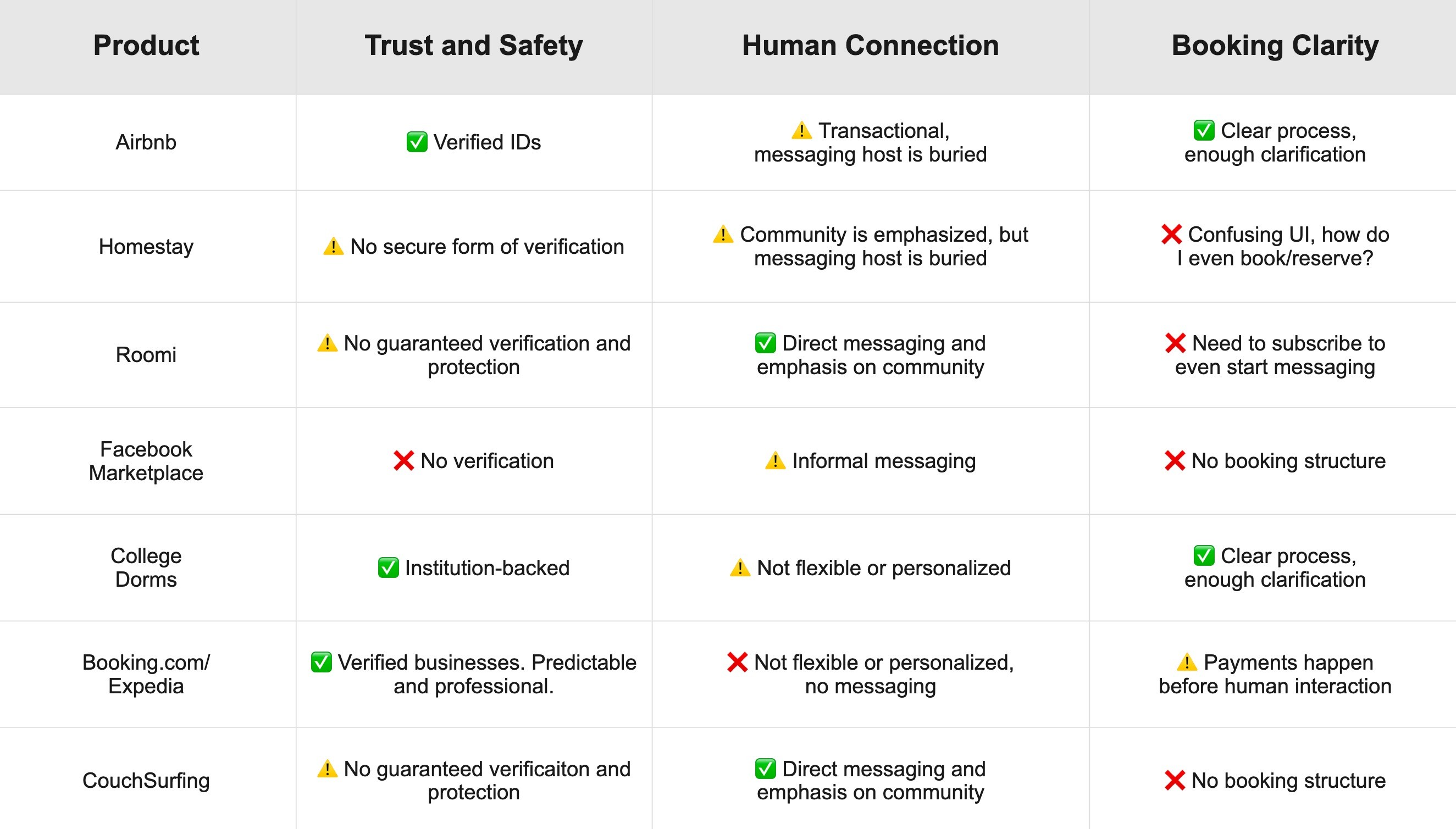
Competitor analysis

Competitor analysis

What will make Host Guest different?

Initial research results

Initial research results

What competitor pain points will be turned into Host Guest's strengths?

Transparent
verification

  • Verified ID badge

  • Host liability insurance coverage

  • Verified ID badge

  • Host liability insurance coverage

Pre-booking communication with Host


  • Message before booking option

  • Reservation before payment

  • Message before booking option

  • Reservation before payment

Guided, transparent booking flow

  • Visible, clarifying information

  • Clear next steps

  • Visible, clarifying information

  • Clear next steps

Low-fi wireframes and user testing

Low-fi wireframes and user testing

Testing early concepts with Target Group

I created rough mockups to test with 4 international students, 4 domestic students/grads, and 4 frequent travelers. I asked them specific questions, and to think out loud while going through the flow.

AFFINITY DIAGRAM

AFFINITY DIAGRAM

From the interviews and testing, I created an affinity diagram.

Here are the common pain points from the interviews:

Here are the common pain points from the interviews:

A/B TESTING

⚠️ Early asynchronous work led to inconsistencies

The other UX intern, Jordan, designed the host flow while I worked on the guest flow. Because we worked separately within the same design system, inconsistencies emerged around shared features like booking statuses. We turned this into an opportunity to conduct A/B testing with past interview participants, helping us refine a more cohesive and user-friendly system across both user groups.

I learned that misalignment can strengthen the design process, and that design systems extend beyond colors and components to include structure and layout consistency.

B (Jordan's)

A (mine)

Final Booking Status design

The participants critiqued the two designs above which informed our final design.

The participants critiqued the two designs above which informed our final design.

FINAL DESIGN

FINAL DESIGN

Balancing simplicity and depth: Onboarding and filtering minimizes overwhelm with progressive disclosure, while the dashboard has more detailed information to support deeper exploration.

When users land on the explore page, they start with basic filters to find homes, then refine their search with more specific options.

When the user clicks on a listing, they can see detailed info on the home and the host, as well as clear CTA buttons and guidance on next steps.

When the user clicks on a listing, they can see detailed info on the home and the host, as well as clear CTA buttons and guidance on next steps.

The user can message the host before reserving, increasing human interaction before making a decision. The user is also notified that verification is required for everyone, further soldifying the security.

The user can message the host before reserving, increasing human interaction before making a decision. The user is also notified that verification is required for everyone, further soldifying the security.

After making a reservation, the user will be directed to their dashboard where they can clearly see their booking status.

After making a reservation, the user will be directed to their dashboard where they can clearly see their booking status.

The Connections and Messages page allow users to build trust by connecting with hosts and guests through shared experiences and mutual connections.

Filter homes to fit user criteria
1.
1.
View listing with detailed info
2.
2.
Message and verify before reserving
3.
3.
Stay updated on reservation and payment status
4.
4.
Detailed dashboard that reinforces reliability.
5

Making designs consistent for all user groups

I was in charge of the guest flow, while the other UX Design Intern handled the host flow. Since many guest features had to align seamlessly with host features, this collaboration taught me the importance of constantly syncing with other designers to make sure every user group is experiencing a consistent product.

Understanding the Developers' and PM's POV

Collaborating closely with the Product Manager and developers gave me valuable insight into the backend of building a platform. We regularly discussed financial, technical, and scope constraints in weekly meetings, and I iterated on my designs to align with those realities.

Skills I gained from this experience

Skills I gained from this experience

Making designs consistent for all user groups

I was in charge of the guest flow for this internship, and I worked closely with the other UX Design Intern, who worked on the host flow. Since many guest features had to align seamlessly with host features, this collaboration taught me the importance of constantly syncing with other designers to make sure all perspectives of the product are consistent with the design system.

Understanding the Developers' and PM's POV

Collaborating closely with the Product Manager and developers gave me valuable insight into the backend of building a platform. We regularly discussed financial, technical, and scope constraints in weekly meetings, and I iterated on my designs to align with those realities.

[Host Guest] 0→1 Booking Platform

Role

UI/UX Designer

Team

2 UX Designers, 1 Product Manager, 2 Developers


Timeline

May - Aug 2025

Tools/Skills

UX Research, UI Design, Figma, Miro

The solution

A reliable booking journey that builds user confidence, reducing drop-off from 70% to 24.5%

Transparent
verification

  • Verified ID badge

  • Host liability insurance coverage

Pre-booking communication with Host


  • Message before booking option

  • Reservation before payment

Guided, transparent booking flow

  • Visible, clarifying information

  • Clear next steps

Initial research results

So, what competitor pain points can be turned into Host Guest's strengths?

AFFINITY DIAGRAM

From the interviews and testing, I created an affinity diagram.

Here are the common pain points from the interviews:

A

B

Final Booking Status Design

The participants critiqued the two designs above which informed our final design.

A/B TESTING

⚠️ Early asynchronous work led to inconsistencies

The other UX design intern was building the host perspective of the platform. We did our best to sync our designs, but sometimes our designs turned out completely different - like the booking dashboard page. We decided to take this as an opportunity to conduct A/B testing with our previous interview participants so we can create a more consistent and user-friendly design system across the two main user groups of the platform.

Competitor analysis

What will make Host Guest different?

Skills I gained from this experience

Making designs consistent for all user groups

I was in charge of the guest flow for this internship, and I worked closely with the other UX Design Intern, who worked on the host flow. Since many guest features had to align seamlessly with host features, this collaboration taught me the importance of constantly syncing with other designers to make sure all perspectives of the product are consistent with the design system.

Understanding the Developers' and PM's POV

Collaborating closely with the Product Manager and developers gave me valuable insight into the backend of building a platform. We regularly discussed financial, technical, and scope constraints in weekly meetings, and I iterated on my designs to align with those realities.

[Host Guest] 0→1 Booking Platform

Role

UI/UX Designer

Team

2 UX Designers, 1 Product Manager, 2 Developers


Timeline

May - Aug 2025

Tools/Skills

UX Research, UI Design, Figma, Miro

Initial research results

So, what competitor pain points can be turned into Host Guest's strengths?

Transparent
verification

  • Verified ID badge

  • Host liability insurance coverage

Pre-booking communication with Host


  • Message before booking option

  • Reservation before payment

Guided, transparent booking flow

  • Visible, clarifying information

  • Clear next steps

Low-fi wireframes and user testing

Testing early concepts with Target Group

I created rough mockups to test with 4 international students, 4 domestic students/grads, and 4 frequent travelers. I asked them specific questions, and to think out loud while going through the flow.

AFFINITY DIAGRAM

From the interviews and testing, I created an affinity diagram.

Here are the common pain points from the interviews:

A

B

Final Booking Status Design

A/B TESTING

⚠️ Early asynchronous work led to inconsistencies

The other UX intern, Jordan, designed the host flow while I worked on the guest flow. Because we worked separately within the same design system, inconsistencies emerged around shared features like booking statuses. We turned this into an opportunity to conduct A/B testing with past interview participants, helping us refine a more cohesive and user-friendly system across both user groups.

I learned that misalignment can strengthen the design process, and that design systems extend beyond colors and components to include structure and layout consistency.

Competitor analysis

What will make Host Guest different?

context

There's a gap in the hospitality and tourism market, and Host Guest fills it.
There's a gap in the hospitality and tourism market,
and Host Guest fills it.

Host Guest goes beyond traditional transactional booking and convenience. It’s a relationship-centered platform for affordable housing that builds trust, belonging, and lasting connections for students, travelers, and people relocating.

jlee88@risd.edu

Linkedin

Jessalyn © 2025

jlee88@risd.edu

Linkedin

Jessalyn © 2025

Made with 🩷, ☕️

FINAL DESIGN

Balancing simplicity and depth: Onboarding and filtering minimizes overwhelm with progressive disclosure, while the dashboard has more detailed information to support deeper exploration.

Filter homes to fit
user criteria
1.

When users land on the explore page, they start with basic filters to find homes, then refine their search with more specific options.

View listing with detailed info
2.

When the user clicks on a listing, they can see detailed info on the home and the host, as well as clear CTA buttons and guidance on next steps.

Message and verify before reserving
3.

The user can message the host before reserving, increasing human interaction before making a decision. The user is also notified that verification is required for everyone, further soldifying the security.

Stay updated on reservation and payment status
4.

After making a reservation, the user will be directed to their dashboard where they can clearly see their booking status.

Detailed dashboard that reinforces reliability.
5.

The Connections and Messages page allow users to build trust by connecting with hosts and guests through shared experiences and mutual connections.

jlee88@risd.edu

Linkedin

Jessalyn © 2025

Made with 🩷, ☕️

context

There's a gap in the hospitality and tourism market, and Host Guest fills it.

Host Guest goes beyond traditional transactional booking and convenience. It’s a relationship-centered platform for affordable housing that builds trust, belonging, and lasting connections for students, travelers, and people relocating.

context

There's a gap in the hospitality and tourism market, and Host Guest fills it.

Host Guest goes beyond traditional transactional booking and convenience. It’s a relationship-centered platform for affordable housing that builds trust, belonging, and lasting connections for students, travelers, and people relocating.

PROBLEM

Users are hesitant to book and pay to live with a stranger through a new platform, causing Host Guest to lose 70% of users before they even reach checkout.

Students and travelers face limited, costly, and impersonal traditional housing options. Host Guest enables a safe and efficient way to connect hosts and guests through secure booking.

PROBLEM

Users are hesitant to book and pay to live with a stranger through a new platform, causing Host Guest to lose 70% of users before they even reach checkout.

Students and travelers face limited, costly, and impersonal traditional housing options. Host Guest enables a safe and efficient way to connect hosts and guests through secure booking.

unused design

Designed full internal finance system BUT it wasn't used

Our team pivoted to an accelerated MVP launch, requiring me to quickly replace an internal payment flow with Stripe Connect integration to strengthen user trust. Despite development constraints and limited post-internship involvement, I delivered a complete MVP experience and learned to prioritize product goals, adaptability, and collaboration over attachment to finished work.

AFFINITY DIAGRAM

From the interviews and testing, I created an affinity diagram.

Here are the common pain points from the interviews:

A/B TESTING

⚠️ Early asynchronous work led to inconsistencies

The other UX intern, Jordan, designed the host flow while I worked on the guest flow. Because we worked separately within the same design system, inconsistencies emerged around shared features like booking statuses. We turned this into an opportunity to conduct A/B testing with past interview participants, helping us refine a more cohesive and user-friendly system across both user groups.

I learned that misalignment can strengthen the design process, and that design systems extend beyond colors and components to include structure and layout consistency.

A (mine)

B (Jordan's)

Final Booking Status Design

Skills I gained from this experience

Making designs consistent for all user groups

I was in charge of the guest flow for this internship, and I worked closely with the other UX Design Intern, who worked on the host flow. Since many guest features had to align seamlessly with host features, this collaboration taught me the importance of constantly syncing with other designers to make sure all perspectives of the product are consistent with the design system.

Understanding the Developers' and PM's POV

Collaborating closely with the Product Manager and developers gave me valuable insight into the backend of building a platform. We regularly discussed financial, technical, and scope constraints in weekly meetings, and I iterated on my designs to align with those realities.

Skills I gained from this experience

Making designs consistent for all user groups

I was in charge of the guest flow for this internship, and I worked closely with the other UX Design Intern, who worked on the host flow. Since many guest features had to align seamlessly with host features, this collaboration taught me the importance of constantly syncing with other designers to make sure all perspectives of the product are consistent with the design system.

Understanding the Developers' and PM's POV

Collaborating closely with the Product Manager and developers gave me valuable insight into the backend of building a platform. We regularly discussed financial, technical, and scope constraints in weekly meetings, and I iterated on my designs to align with those realities.

Low-fi wireframes and user testing

Testing early concepts with Target Group

I created rough mockups to test with 12 people from my target audience (4 international students, 4 domestic students/grads, and 4 frequent travelers). I asked the following guiding questions to gain insight into what's happening in their minds. I also asked them to think out loud.

Filter homes to fit user criteria
1.

When users land on the explore page, they start with basic filters to find homes, then refine their search with more specific options.

View listing with detailed info
2.

When the user clicks on a listing, they can see detailed info on the home and the host, as well as clear CTA buttons and guidance on next steps.

Message and verify before reserving
3.

The user can message the host before reserving, increasing human interaction before making a decision. The user is also notified that verification is required for everyone, further soldifying the security.

Stay updated on reservation and payment status
4.

After making a reservation, the user will be directed to their dashboard where they can clearly see their booking status.

Detailed dashboard that reinforces reliability.
5.

The Connections and Messages page allow users to build trust by connecting with hosts and guests through shared experiences and mutual connections.

FINAL DESIGN

Balancing simplicity and depth: Onboarding and filtering minimizes overwhelm with progressive disclosure, while the dashboard has more detailed information to support deeper exploration.

The solution

A reliable booking journey that builds user confidence, reducing drop-off from 70% to 24.5%

The solution

A reliable booking journey that builds user confidence, reducing drop-off from 70% to 24.5%

FINAL DESIGN

Balancing simplicity and depth: Onboarding and filtering minimizes overwhelm with progressive disclosure, while the dashboard has more detailed information to support deeper exploration.

Filter homes to fit user criteria
1.

When users land on the explore page, they start with basic filters to find homes, then refine their search with more specific options.

View listing with detailed info
2.

When the user clicks on a listing, they can see detailed info on the home and the host, as well as clear CTA buttons and guidance on next steps.

Message and verify before reserving
3.

The user can message the host before reserving, increasing human interaction before making a decision. The user is also notified that verification is required for everyone, further soldifying the security.

Stay updated on reservation and payment status
4.

After making a reservation, the user will be directed to their dashboard where they can clearly see their booking status.

Detailed dashboard that reinforces reliability.
5.

The Connections and Messages page allow users to build trust by connecting with hosts and guests through shared experiences and mutual connections.