★ 3Play Media

Redesigned a complex B2B Video Accessibility & Localization service order form to solve cognitive overload.

Role

Lead UX Designer

Team

2 UX Leads, 1 Product Manager, 1 Product Marketer, 3 Consultants


Timeline

Aug 2025 -

Dec 2025

Tools/Skills

UX Research, UI Design, Figma, Cursor, Client Relations

what did i do?

I led the redesign vision for the service order form to decrease support dependency and reduce ordering errors.

The original service order form for 3Play Media contains numerous friction points for the user. Customers struggle to navigate the form, resulting in disappointing outcomes. I led a 5-person team to redesign the complex order form for a B2B Video Accessibility & Localization platform to solve cognitive overload.

what did i do?

I led the redesign vision for the service order form to decrease support dependency and reduce ordering errors.

The original service order form for 3Play Media contains numerous friction points for the user. Customers struggle to navigate the form, resulting in disappointing outcomes. I led a 5-person team to redesign the complex order form for a B2B Video Accessibility & Localization platform to solve cognitive overload.

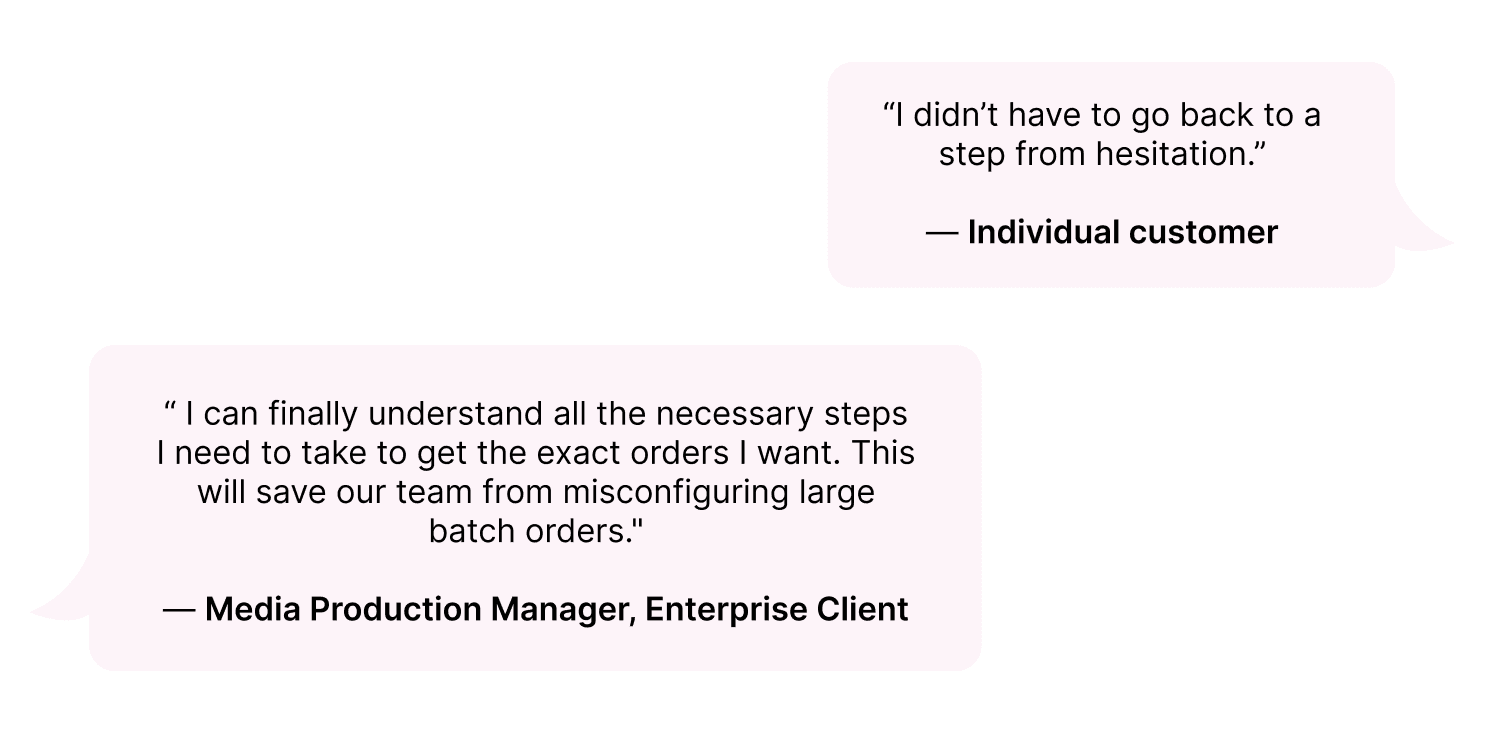
My redesign increased 10 Customer Satisfaction Scores by 80%

USER INTERVIEWS

I interviewed 4 internal employees that assist customers with the order form.

The goal is to identify the friction points in the current ordering process to inform a redesign that will allow customers to self-serve and rely less on company support. The participants are Customer Success Managers, a Senior Technical Support Specialist, a Senior BDR Manager, who work with various external customers on a daily basis. I observed their natural workflow and identified friction points in real-time.
Identifying the problems

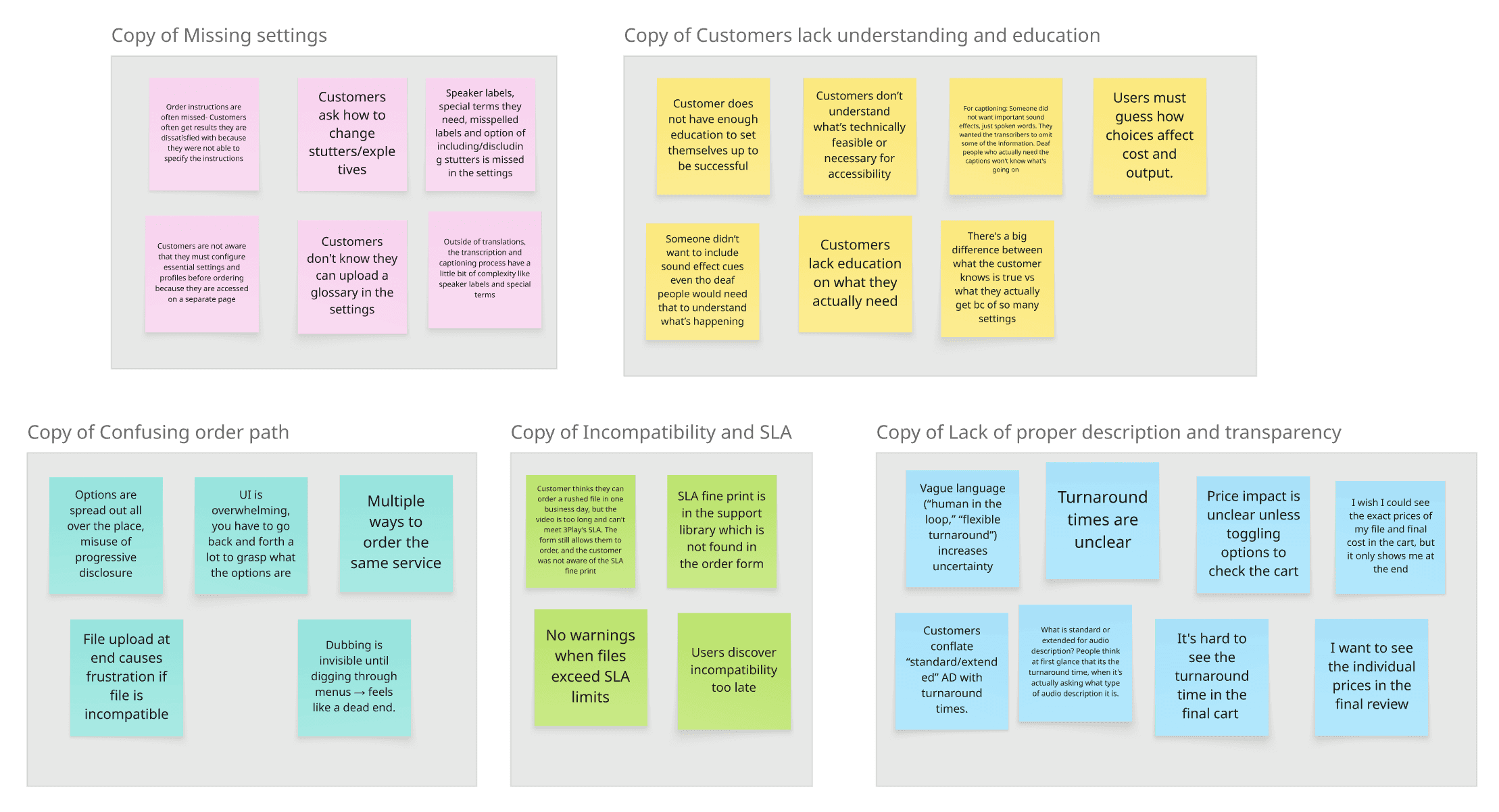
I narrowed down the responses to 3 main pain points in the order form:

Missed Critical Decisions

"There are so many hidden options in this form that are crucial for a truly customizable order. Customers don't know about these details."

Disorganized Order Path

"You have to keep going back and forth pages and buttons to see what all the options are."

Unclear Descriptions, Status, and Results

“I don’t even know if anything I’m doing is correct, so I'm worried the result is not going to be what I want.”

Balancing Business and User Needs

Leadership Skills

As the Lead Designer for this project, I learned the importance of considering all proposals while also making firm decisions that I believe are in the design's best interest. My team of 5 consisted of students from both engineering and design backgrounds, and our stakeholders were 3Play's Product Manager and Product Marketer, both whom don't specialize in design. As the leader, I challenged design decisions and unblocked design problems while also advocating for my team.

Skills I Gained from this Experience

I had differing perspectives from the Product Marketer about the use of disabled controls, or greyed out options, to indicate features unavailable for the selected language. He believed these disabled controls increased awareness of additional offerings and potential upsell opportunities, but I believed they created confusion by presenting users with options they couldn’t act on. While I was thinking for the user, he was thinking for the business. I initiated a solution bridging both needs by designing a limitation message that appeared only after selecting a language to inform the users, but not overwhelm them.

★ 3Play Media

Redesigning a complex AI transcription service order form to solve cognitive overload.

Role

Lead UX Designer

Team

2 UX Leads, 1 Product Manager, 1 Product Marketer, 2 Consultants


Timeline

Aug 2025 - Dec 2025

Tools/Skills

UX Research, UI Design, Figma, Cursor, Client Relations

The solution

My redesign increased 10 Customer Satisfaction Scores by 80%

Identifying the problems

I narrowed down the responses to 3 main pain points in the order form:

Missed Critical Decisions

"There are so many hidden options in this form that are crucial for a truly customizable order. Customers don't know about these details."

Disorganized Order Path

"You have to keep going back and forth pages and buttons to see what all the options are."

Unclear Descriptions, Status, and Results

“I don’t even know if anything I’m doing is correct, so I'm worried the result is not going to be what I want.”

★ 3Play Media

Redesigning a complex AI transcription service order form to solve cognitive overload.

Role

Lead UX Designer

Team

2 UX Leads, 1 Product Manager, 1 Product Marketer, 2 Consultants


Timeline

Aug 2025 - Dec 2025

Tools/Skills

UX Research, UI Design, Figma, Cursor, Client Relations

Identifying the problems

I narrowed down the responses to 3 main pain points in the order form:

Missed Critical Decisions

"There are so many hidden options in this form that are crucial for a truly customizable order. Customers don't know about these details."

Disorganized Order Path

"You have to keep going back and forth pages and buttons to see what all the options are."

Unclear Descriptions, Status, and Results

“I don’t even know if anything I’m doing is correct, so I'm worried the result is not going to be what I want.”

USER INTERVIEWS

I interviewed 4 internal employees that assist customers with the order form.

The goal is to identify the friction points in the current ordering process to inform a redesign that will allow customers to self-serve and rely less on company support. The participants are Customer Success Managers, a Senior Technical Support Specialist, a Senior BDR Manager, who work with various external customers on a daily basis. I observed their natural workflow and identified friction points in real-time.

The solution

My redesign increased 10 Customer Satisfaction Scores by 80%

jlee88@risd.edu

Linkedin

Jessalyn © 2025

Made with 🩷, ☕️

jlee88@risd.edu

Linkedin

Jessalyn © 2025

Made with 🩷, ☕️

jlee88@risd.edu

Linkedin

Jessalyn © 2025

Made with 🩷, ☕️

Uploading a File

✅ Upload files is in the beginning to allow the user to view pricing progress

✅ Displays limitations message before continuing

❌ Upload files is at the end so the user can't see the pricing for the video as they fill out the form

❌ Users discover incompatibility too late due to a lack of warning messages

Original

Improved

Final Review Page

Original

Improved

❌ Does not show detailed review of prices and settings

❌ Terms and conditions can be missed

❌ Turnaround times are buried in text.

❌ The final cost is only shown at the end

✅ Shows details of each service selected to ensure confidence and also allow for editing

✅ Terms and Conditions is an active checkbox step.

✅ Turnaround time is emphasized

✅ Final cost is shown at the end and also throughout the form

USER FLOWs

Comparing the User Flows visually demonstrate the reduced cognitive overload.

The flow of the new design has a more straightforward path and takes 3 minutes less on average. Participants claimed that they needed support on the original form, but felt confident completing the new form on their own.

The flow of the new design has a more straightforward path and takes 3 minutes less on average. Participants claimed that they needed support on the original form, but felt confident completing the new form on their own.

Comparing the User Flows visually demonstrate the reduced cognitive overload.

USER FLOWs

Average Task Time:

9 minutes

Average Task Time:

9 minutes

Average Task Time:

9 minutes

Average Task Time:

9 minutes

Original Form

Original Form

Redesigned Form

Redesigned Form

Average Task Time:

6 minutes

Average Task Time:

6 minutes

Average Task Time:

6 minutes

Average Task Time:

6 minutes

overcoming an obstacle

⚠️ Facing a Roadblock

The Product Marketer from 3Play wanted to use Cursor AI to prototype the wireframes from start to finish, but it made the design process unnecessarily rough. There was so much unnecessary debugging and the designs did not properly translate to how we wanted it to turn out, even after feeding our low-fi mockups into Cursor. However, this gave us a way to easily test our initial mockups with a working prototype. It would have taken much longer to prototype the low-fi wireframes in Figma. But for the final high-fidelity designs, I polished everything in Figma.

ITERATIONS

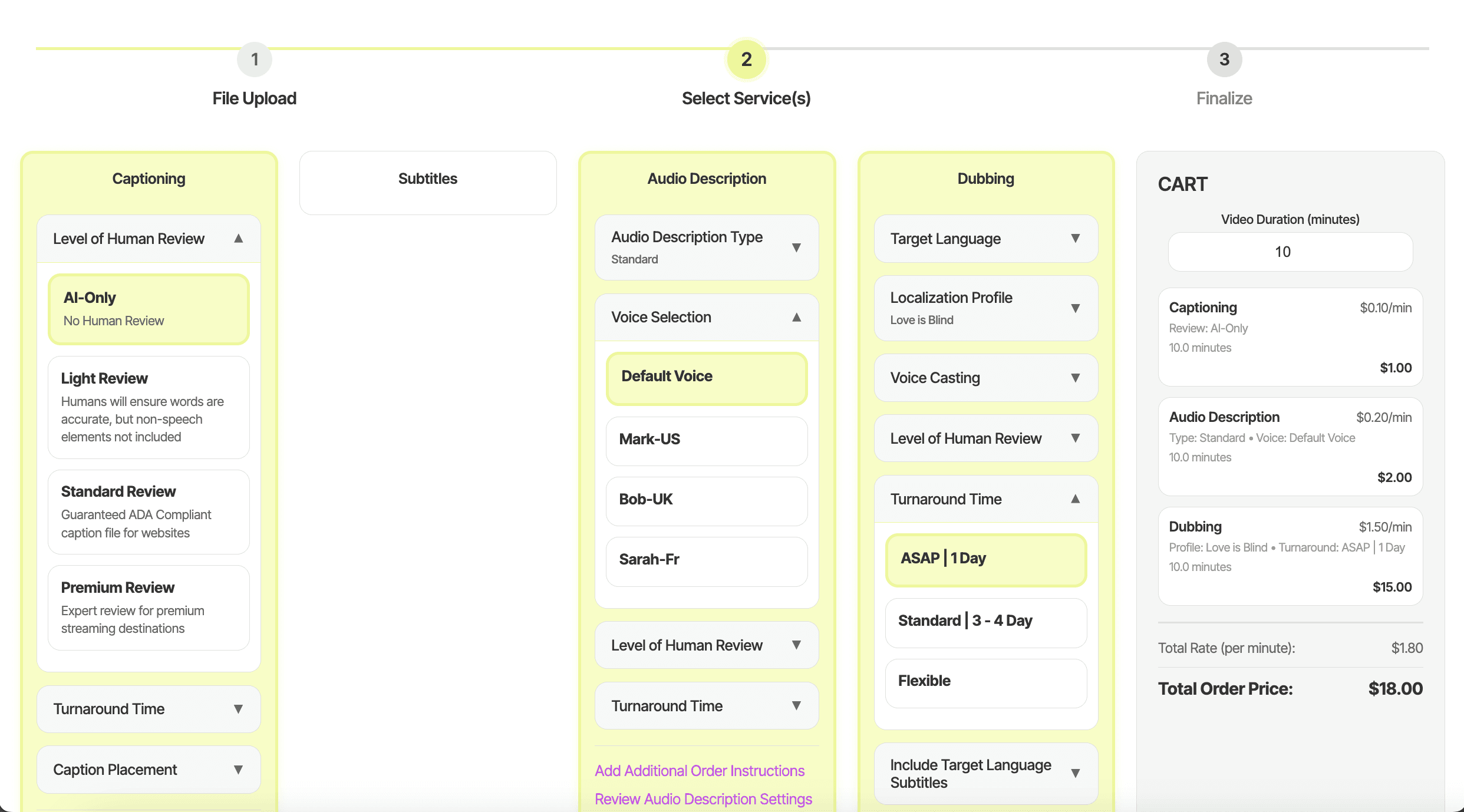
Implementation of the Accordion Format in the Service Selection
  1. Original Form

❌ The different sized boxes are overhwhelming and confusing

❌ Certain settings must be configured outside the order form before ordering

❌ The Order Instructions button is often missed

❌ The flow is scattered over two pages, therefore creating multiple order paths.

❌ There is no calculation of actual prices in the cart

  1. Initial Ideation

The first prototype we created in Cursor allowed us to test our initial ideation with real clients. We interviewed them on their experience to inform our final design, and this is some of their feedback:

❌ "There are a lack of descriptions"

❌ "There's too much white space"

❌ "I don't like how condensed each service is. If I only choose one service, I am working with less than a fifth of the page"
✅ "The accordion style is much easier to navigate and understand than the original design"

✅ "I like that I can see the actual prices in the cart."

  1. Final Service Selection Design with Accordions

✅ Detailed descriptions, but not visually overwhelming

✅ Self-reliant progressive disclosure with accordions

✅ Single ordering path per service, embedding settings and instructions directly in the order flow

✅ Transparent pricing

✅ Clear error messaging and required fields

✅ Detailed descriptions, but not visually overwhelming

✅ Self-reliant progressive disclosure with accordions

✅ Single ordering path per service, embedding settings and instructions directly in the order flow

✅ Transparent pricing

✅ Clear error messaging and required fields

overcoming an obstacle

⚠️ Facing a Roadblock

The Product Marketer from 3Play wanted to use Cursor AI to prototype the wireframes from start to finish, but it made the design process unnecessarily rough. There was so much unnecessary debugging and the designs did not properly translate to how we wanted it to turn out, even after feeding our low-fi mockups into Cursor. However, this gave us a way to easily test our initial mockups with a working prototype. It would have taken much longer to prototype the low-fi wireframes in Figma. But for the final high-fidelity designs, I polished everything in Figma.

ITERATIONS

Implementation of the Accordion Format in the Service Selection
  1. Original Form

  1. Initial Ideation

The first prototype we created in Cursor allowed us to test our initial ideation with real clients. We interviewed them on their experience to inform our final design, and this is some of their feedback:

❌ "There are a lack of descriptions"

❌ "There's too much white space"

❌ "I don't like how condensed each service is. If I only choose one service, I am working with less than a fifth of the page"
✅ "The accordion style is much easier to navigate and understand than the original design"

✅ "I like that I can see the actual prices in the cart."

  1. Final Service Selection Design with Accordions

✅ Detailed descriptions, but not visually overwhelming

✅ Self-reliant progressive disclosure with accordions

✅ Single ordering path per service, embedding settings and instructions directly in the order flow

✅ Transparent pricing

✅ Clear error messaging and required fields

Uploading a File

✅ Upload files is in the beginning to allow the user to view pricing progress

✅ Displays any limitations before continuing

❌ Upload files is at the end so the user can't see the pricing for the video as they fill out the form

❌ Users discover incompatibility too late due to a lack of warning messages

Original

Improved

Final Review Page

Original

Improved

❌ Does not show detailed review of prices and settings

❌ Terms and conditions can be missed

❌ Turnaround times are buried in text.

❌ The final cost is only shown at the end

✅ Shows details of each service selected to ensure confidence and also allow for editing

✅ Terms and Conditions is an active checkbox step.

✅ Turnaround time is emphasized

✅ Final cost is shown at the end and also throughout the form

overcoming an obstacle

⚠️ Facing a Roadblock

The Product Marketer from 3Play wanted to use Cursor AI to prototype the wireframes from start to finish, but it made the design process unnecessarily rough. There was so much unnecessary debugging and the designs did not properly translate to how we wanted it to turn out, even after feeding our low-fi mockups into Cursor. However, this gave us a way to easily test our initial mockups with a working prototype. It would have taken much longer to prototype the low-fi wireframes in Figma. But for the final high-fidelity designs, I polished everything in Figma.

ITERATIONS

Implementation of the Accordion Format in the Service Selection

  1. Original Form

  1. Initial Ideation

The first prototype we created in Cursor allowed us to test our initial ideation with real clients. We interviewed them on their experience to inform our final design, and this is some of their feedback:

❌ "There are a lack of descriptions"

❌ "There's too much white space"

❌ "I don't like how condensed each service is. If I only choose one service, I am working with less than a fifth of the page"
✅ "The accordion style is much easier to navigate and understand than the original design"

✅ "I like that I can see the actual prices in the cart."

  1. Final Service Selection Design with Accordions

✅ Detailed descriptions, but not visually overwhelming

✅ Self-reliant progressive disclosure with accordions

✅ Single ordering path per service, embedding settings and instructions directly in the order flow

✅ Transparent pricing

✅ Clear error messaging and required fields

USER FLOWs

Comparing the User Flows visually demonstrate the reduced cognitive overload.

The flow of the new design has a more straightforward path and takes 3 minutes less on average. Participants claimed that they needed support on the original form, but felt confident completing the new form on their own.

Original Form Average Task Time:

9 minutes

Redesigned form Average Task Time:

6 minutes

Uploading a File

✅ Upload files is in the beginning to allow the user to view pricing progress

✅ Displays any limitations before continuing

❌ Upload files is at the end so the user can't see the pricing for the video as they fill out the form

❌ Users discover incompatibility too late due to a lack of warning messages

Original

Improved

Final Review Page

Original

Improved

❌ Does not show detailed review of prices and settings

❌ Terms and conditions can be missed

❌ Turnaround times are buried in text.

❌ The final cost is only shown at the end

✅ Shows details of each service selected to ensure confidence and also allow for editing

✅ Terms and Conditions is an active checkbox step.

✅ Turnaround time is emphasized

✅ Final cost is shown at the end and also throughout the form

Reflection

Balancing Business and User Needs

I had differing perspectives from the Product Marketer about the use of disabled controls, or greyed out options, to indicate features unavailable for the selected language. He believed these disabled controls increased awareness of additional offerings and potential upsell opportunities, but I believed they created confusion by presenting users with options they couldn’t act on. While I was thinking for the user, he was thinking for the business. I initiated a solution bridging both needs by designing a limitation message that appeared only after selecting a language to inform the users, but not overwhelm them.

Leadership Skills

As the Lead Designer for this project, I learned the importance of considering all proposals while also making firm decisions that I believe are in the design's best interest. My team of 5 consisted of students from both engineering and design backgrounds, and our stakeholders were 3Play's Product Manager and Product Marketer, both whom don't specialize in design. As the leader, I challenged design decisions and unblocked design problems while also advocating for my team.

Reflection

Leadership Skills

As the Lead Designer for this project, I learned the importance of considering all proposals while also making firm decisions that I believe are in the design's best interest. My team of 5 consisted of students from both engineering and design backgrounds, and our stakeholders were 3Play's Product Manager and Product Marketer, both whom don't specialize in design. As the leader, I challenged design decisions and unblocked design problems while also advocating for my team.

Balancing Business and User Needs

I had differing perspectives from the Product Marketer about the use of disabled controls, or greyed out options, to indicate features unavailable for the selected language. He believed these disabled controls increased awareness of additional offerings and potential upsell opportunities, but I believed they created confusion by presenting users with options they couldn’t act on. While I was thinking for the user, he was thinking for the business. I initiated a solution bridging both needs by designing a limitation message that appeared only after selecting a language to inform the users, but not overwhelm them.

what did i do?

I led the redesign vision for the service order form to decrease support dependency and reduce ordering errors.

The original service order form for 3Play Media contains numerous friction points for the user. Customers struggle to navigate the form, resulting in disappointing outcomes. I led a 5-person team to redesign the complex order form for a Video Accessibility & Localization B2B platform to solve cognitive conflict.

what did i do?

I led the redesign vision for the service order form to decrease support dependency and reduce ordering errors.

The original service order form for 3Play Media contains numerous friction points for the user. Customers struggle to navigate the form, resulting in disappointing outcomes. I led a 5-person team to redesign the complex order form for a Video Accessibility & Localization B2B platform to solve cognitive conflict.